
AprivaPay1.5.589 - Google Play
You'll be able to see results in few seconds.
Publisher Description
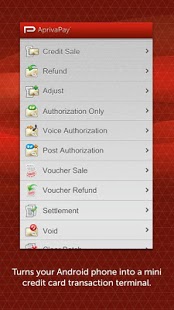
Sell Anything, Anywhere with AprivaPay™
AprivaPay makes credit card transactions easy—whether in the shop or out in the field. This powerful app enables merchants to accept card payments and process transactions right from an Android device.
SOFTWARE-BASED CREDIT CARD TERMINAL
AprivaPay is software that is easily downloaded to your cell phone. The software turns your Android device into a mini credit card transaction terminal that can perform the same functions as a traditional wireless terminal but at a fraction of the cost.
CHOICE
In most cases, you can use your existing payment processing provider. If you don’t accept cards today, or want to shop around, choose from the hundreds of AprivaPay partners that work best for your needs.
GETTING STARTED
Before you can accept credit card payments with AprivaPay, you’ll need to set up a merchant account (if you don’t already have one), so that your bank can fund your transactions. Once you have a merchant account, it’s easy to get started. Here’s what you’ll need:
1. Smartphone with data (service) plan
2. Merchant account (new or existing)
3. AprivaPay downloadable app
4. Optional card reader/printer
EXCEEDING INDUSTRY-LEVEL ENCRYPTION AND SECURITY
Apriva is the leader in wireless credit card transaction technology and provides the most proven and secure platform for wireless information transfer available. AprivaPay is verified compliant with PA-DSS. Our technology is the best in the business.
CUSTOMER SERVICE/TECHNICAL SUPPORT
Apriva provides 24/7 customer support for resellers and end users. We're here to give you the support you need to be successful.
Rooted/Jailbroken devices are not supported due to security risks.
About AprivaPay
The company that develops AprivaPay is Apriva. The latest version released by its developer is 1.5.589.
To install AprivaPay on your Android device, just click the green Continue To App button above to start the installation process. The app is listed on our website since 2013-05-30 and was downloaded 0 times. We have already checked if the download link is safe, however for your own protection we recommend that you scan the downloaded app with your antivirus. Your antivirus may detect the AprivaPay as malware as malware if the download link to com.apriva.mobile.aprivapay is broken.
How to install AprivaPay on your Android device:
- Click on the Continue To App button on our website. This will redirect you to Google Play.
- Once the AprivaPay is shown in the Google Play listing of your Android device, you can start its download and installation. Tap on the Install button located below the search bar and to the right of the app icon.
- A pop-up window with the permissions required by AprivaPay will be shown. Click on Accept to continue the process.
- AprivaPay will be downloaded onto your device, displaying a progress. Once the download completes, the installation will start and you'll get a notification after the installation is finished.
Version History
version 1.5.589
posted on 2013-05-30
version 1.2.453
posted on 2011-05-10
Several fixes and updates
Disclaimer
Official Google Play Link
We do not host AprivaPay on our servers. We did not scan it for viruses, adware, spyware or other type of malware. This app is hosted by Google and passed their terms and conditions to be listed there. We recommend caution when installing it.
The Google Play link for AprivaPay is provided to you by apps112.com without any warranties, representations or guarantees of any kind, so access it at your own risk.
If you have questions regarding this particular app contact the publisher directly. For questions about the functionalities of apps112.com contact us.
